Read Me: The Open Book Project
NOTE: This was originally published on GitHub as README.TXT when I first started the Open Book Project. I was not maintaining this blog in 2019, but the text is presented verbatim as it was shared at the time.
THE PREMISE: As a society, we need an open source device for reading. Books are among the most important documents of our culture, yet the most popular and widespread devices we have for reading — the Kobo, the Nook, the Kindle and even the iPad — are closed devices, operating as small moving parts in a set of giant closed platforms whose owners’ interests are not always aligned with readers’. When Microsoft stopped selling books on their online store this year, they sent a notice to readers that their books would stop working. Read that again: their books will stop working. We’ve built a strange future for ourselves, and it just leaves me thinking: how did we get from buying a copy of words printed on a page, to “Your books will stop working”? Can we take a step back?
Anyway. The Open Book aims to be a simple device that anyone with a soldering iron can build for themselves. The Open Book should be comprehensible: the reader should be able to look at it and understand, at least in broad strokes, how it works. It should be extensible, so that a reader with different needs can write code and add accessories that make the book work for them. It should be global, supporting readers of books in all the languages of the world. Most of all, it should be open, so that anyone can take this design as a starting point and use it to build a better book.
Phase One: The E-Book Feather Wing
The Feather ecosystem seemed like the ideal place to start building this. An eBook reader is an inherently portable device, and all Feather mainboards support LiPo battery operation and charging via USB. All Feather boards work with the Arduino IDE, which is super accessible for anyone to hack on, and newer boards also support CircuitPython, which lowers the bar to entry even further.
The eBook feather wing is designed as a set of modules that add features to the board. Some are more or less mandatory (to achieve a minimum of functionality); some are recommended (to achieve big picture design goals) and some are optional (to enable certain specific use cases). In all cases, the board outlines which modules live where and what they do.
There is an overall BOM here which has everything except for the screen and microSD socket.
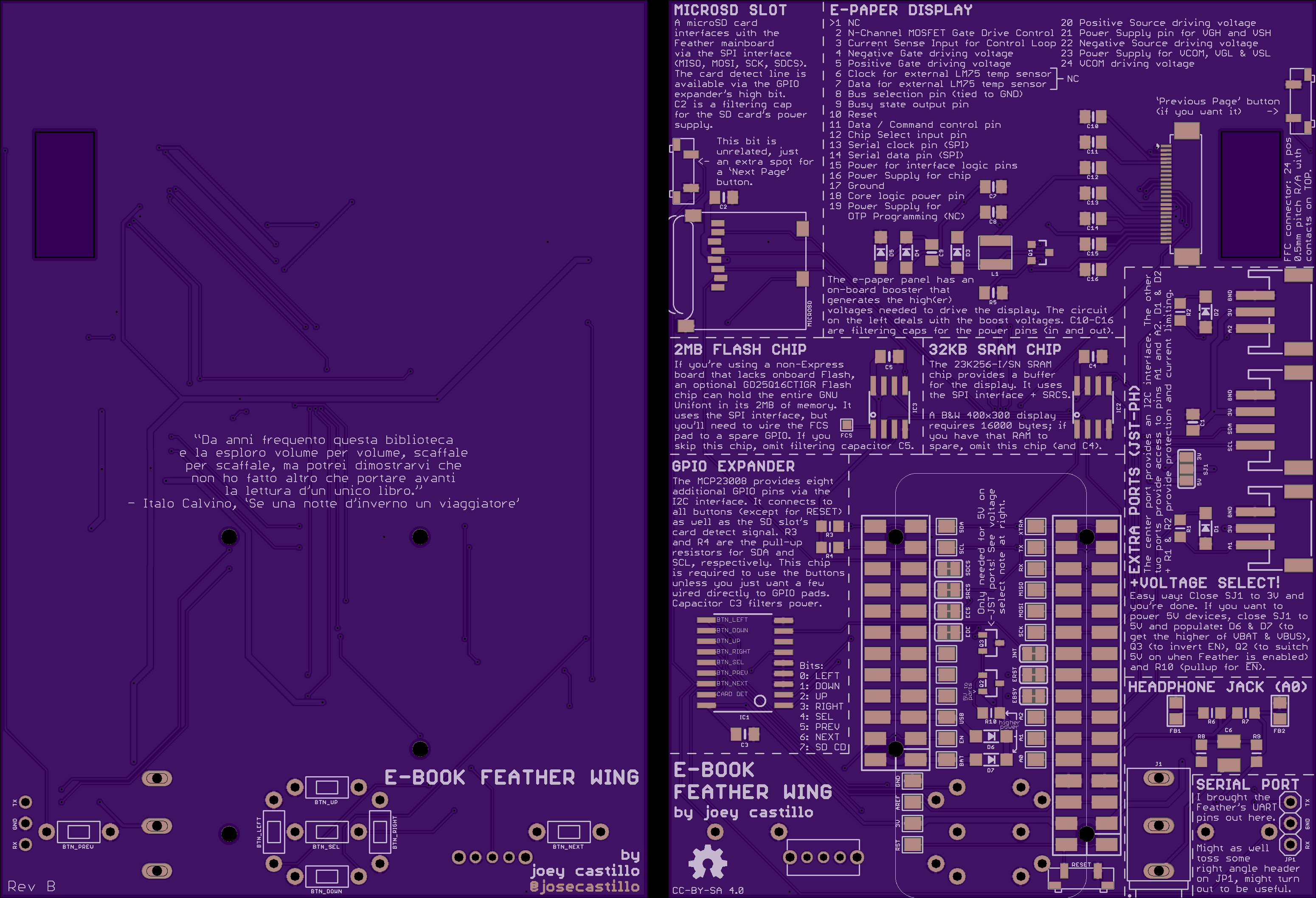
Mandatory Modules and bits
- The e-paper screen and supporting circuitry. You’ll need a 24 position FFC connector with contacts on top, the Waveshare 4.2 inch e-paper display, and all the components in the e-paper display block. Note that many of the capacitors in this block need to be rated for 25V.
- The GPIO expander. It lets you access all the buttons over I2C. You could skip this, and just solder from a few of the pads to the few remaining GPIO pins, but it’s like $1, treat yourself. In the future I’m going to use a shift register for this purpose.
- The feather headers, obviously, to connect a Feather mainboard to the wing.
- The through-hole buttons on the front, at least some of them. Oh and as a side note: these are thru-hole buttons because I wanted to keep all surface mount components on one side.
Recommended Modules
- The MicroSD socket. This is, like, highly recommended. Where else are you going to store your library? Note that you will need a fine tip on your soldering iron or a hot air reflow station to solder this one in.
- The JST-PH ports, and parts in that block. These are so useful to make the book extensible. Imagine a gesture recognizer on the I2C port for someone with limited mobility, or an electret mic for voice control, or a strip of LED’s as a reading light, or any number of things you haven’t imagined yet!
Optional Modules and bits
- The 2MB Flash Chip. I recommend using a Feather M4 Express with this wing. It’s only $3 more than an M0, and it has its own Flash on a dedicated QSPI bus, making this chip totally unnecessary.
- The 32KB SRAM chip. This is more useful when using the Adafruit EPD library, but I’m already preferring GxEPD2 which doesn’t have any use for this chip, so I’m skipping it from here on out.
- The 5V and enable circuit (between the feather headers). It’s a lot of parts just to get a slightly higher voltage to the JST ports. There if you need it, but I’ve been able to run short Neopixel strips from the 3.3V just fine, and since it comes from the regulator, it automatically cuts off when EN goes low.
- The headphone jack and supporting circuitry. It might be useful; I can imagine playing wav file audiobooks from an SD card for example, but you can omit it unless you have a specific audio use case in mind.
- The surface mount buttons (previous page, next page and reset). You can already access the previous and next page buttons on the front, so these are just nice-to-have. And because of the way the Feather connects, its reset button should always be exposed, so you really don’t need another reset button unless you want it.
Going Forward
Ordering the Rev B boards and hoping to assemble one by the end of the month to verify the design. After that, the Phase Two goal is to design a SAMD51-based Feather mainboard with this same capabilities (e-paper screen, buttons, SD card, etc).
I’ll also have to start writing an open source firmware designed to hold a library on an SD card and let people read, but hey, one thing at a time.