Sensor Watch Sleep Dive: Low Power Modes and Battery Tests
Originally published at Crowd Supply.
One of the first questions I got about Sensor Watch came up during our Teardown Session, back when we were assembling the first hundred boards. Helen Leigh, Crowd Supply’s Head of Community, asked: “That one-year battery life: is that real?” The short answer is: I think so! The longer answer involves explaining that thinking, and testing it by experiment.
Sensor Watch is powered by a CR2016 coin cell and, like any other electronic component, that coin cell has a data sheet. In this case, I’m using a data sheet for Energizer’s CR2016 battery, since it was the one I was able to find in the battery aisle at my local grocery store.
This data sheet includes all kinds of useful information, like the precise dimensions of the coin cell, as well as its chemistry and nominal voltage. It also includes its typical capacity (100 milliampere hours, or mAh) and a graph depicting its typical discharge curve:
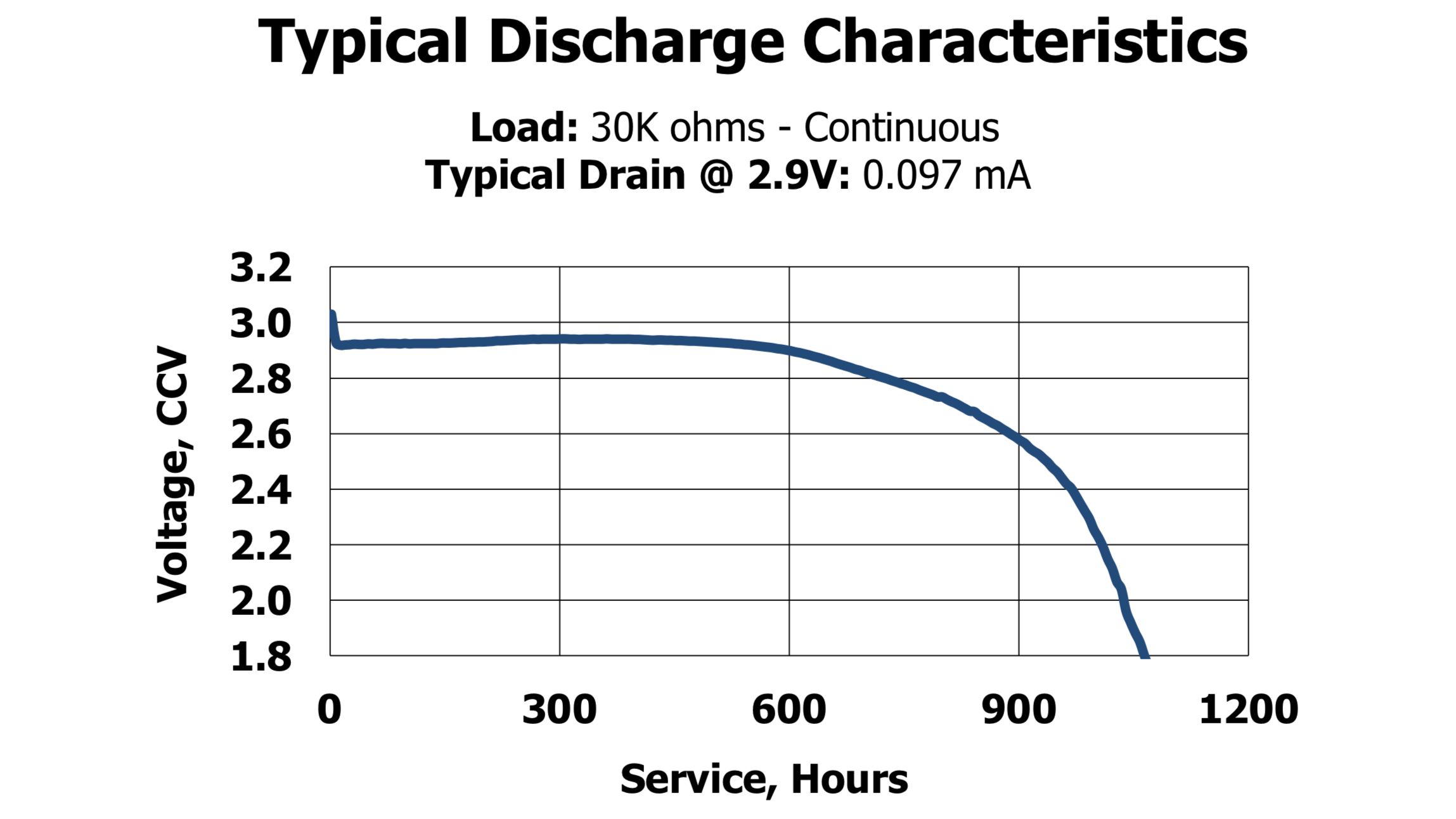
This curve shows the typical voltage level over the course of the battery’s life when discharging at about a tenth of a milliampere (97 microamperes, or µA, to be exact).
This is not a lot of current. For comparison: if you were trying to light up a dim red indicator LED, you’d probably need more than ten times that much — 1 mA, or 1000 µA — and that would drain the battery about ten times faster. But for this hypothetical, let’s stick to what’s on the graph. In this scenario, the battery keeps pretty close to 3 volts for maybe 600 hours. Then it will start to drop, to about 2.6 volts after 900 hours. By 1100 hours, the voltage will have dropped all the way down to 1.8 volts, and the battery will be on its last legs.
If Sensor Watch drew 97 µA, we would expect it to follow this curve and the watch would be dead after 45 days (1100 hours ≈ 45 days).
But of course, Sensor Watch doesn’t draw 97 µA.
How Low Can You Go?
The Microchip SAM L22 is a great fit for this project for a number of reasons. We’ve already talked about its ability to speak the language of our LCD display glass, but it’s also a good fit because it’s deeply optimized for low power consumption. In particular, the CPU, the most power-hungry part of the microcontroller, can enter a standby mode where it consumes almost no power, while the microcontroller keeps running things like the screen and the real-time clock.
Movement, the community firmware for Sensor Watch, takes advantage of this to offer two modes, both of which consume a different amount of current:
- In its normal mode, Movement wakes up the CPU once a second, for a fraction of a second, to update the display. Otherwise, the CPU goes into standby, which prevents it from consuming any power. In this mode, the watch consumes less than 30 µA.
- In sleep mode, Movement turns off everything but the display and one button, and only wakes up the CPU once a minute. In this mode, the watch consumes less than 10 µA.
Let’s look back at that graph from earlier and do some back-of-napkin math. If we can expect to draw 100 µA for 45 days, how long could we expect to draw 30 µA? Hypothetically: one third the consumption ≈ 3x the time! In truth the reality may be a bit different — batteries also discharge themselves, and the chemicals inside deteriorate over time — but it’s useful to get a sense for the orders of magnitude involved:
- 30 µA normal mode: 135 days (45 * 3)
- 10 µA sleep mode: 450 days (45 * 10)
Clearly, we’re only going to hit this year-long battery target if we spend as much time as possible in sleep mode. But before we talk about that, let’s talk about what Sensor Watch does while awake.
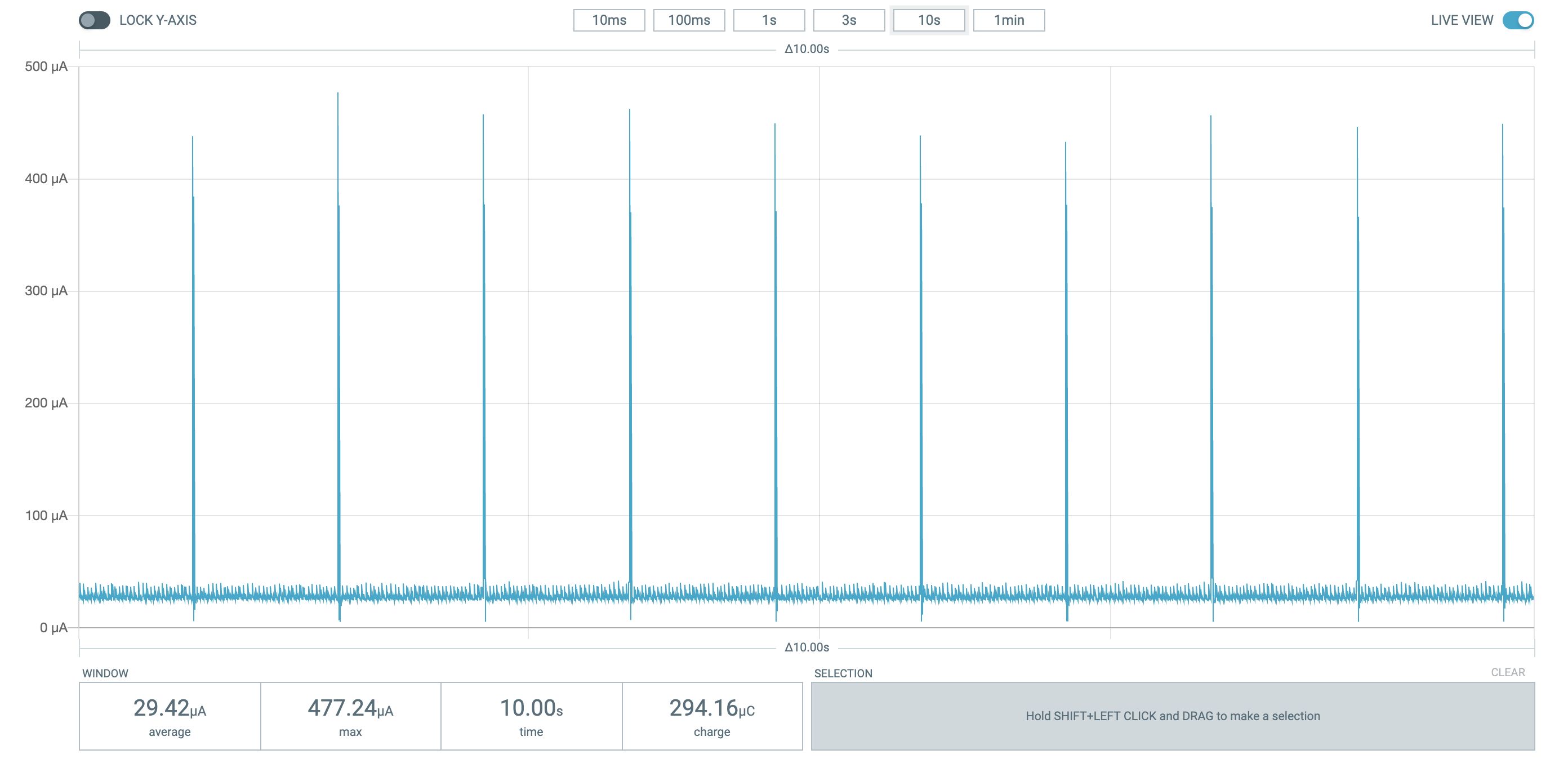
Power trace: ten seconds in normal mode
When Sensor Watch is awake, it’s able to update the display once a second, which means you can have second-level granularity in a time display, or a countdown for the validity window of a two-factor authentication code. When the watch is awake, it’s also ready for you to press the Mode button to change modes, or the Light button to illuminate the screen. This is clearly the mode that’s most useful to folks.
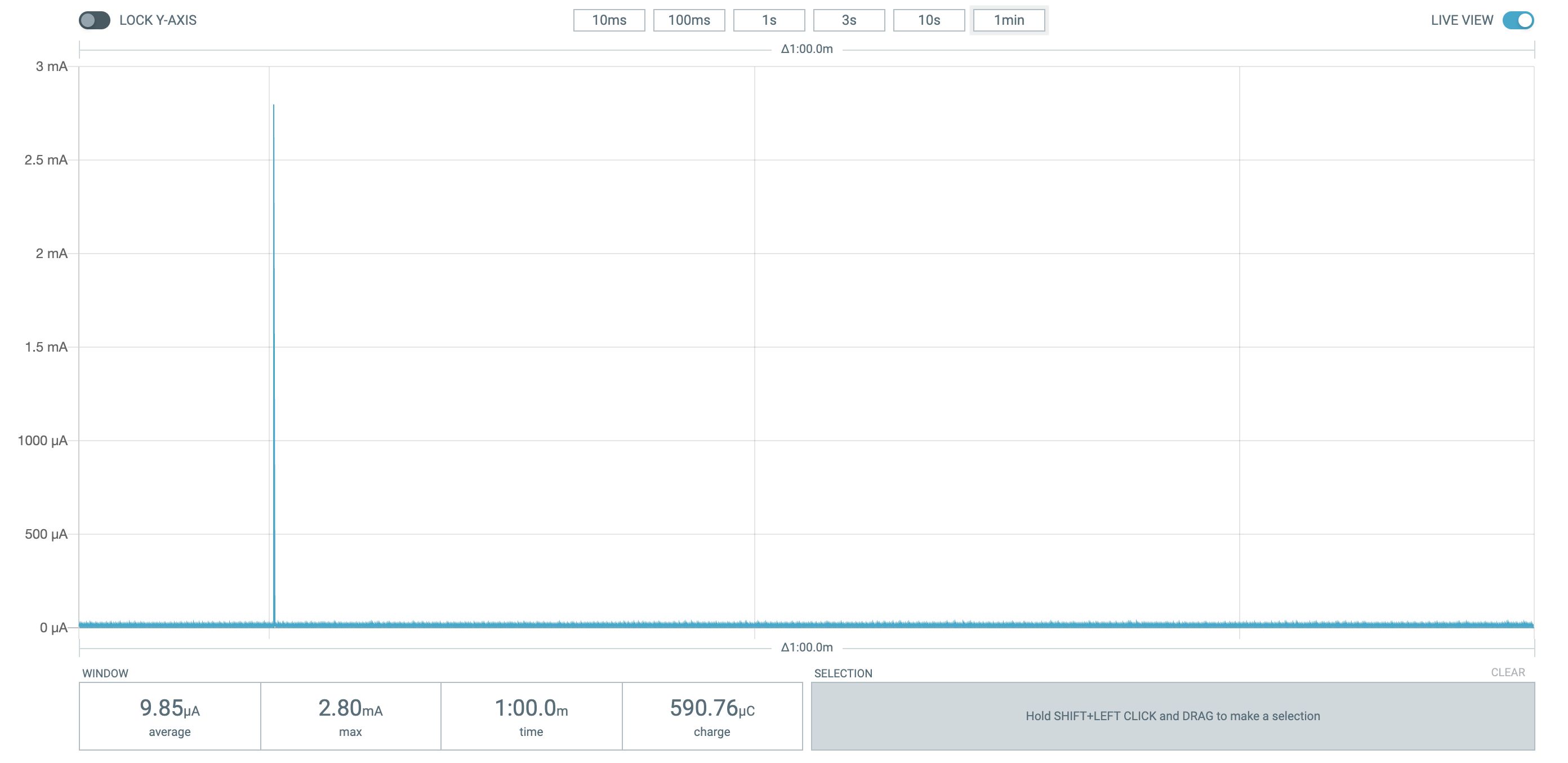
One minute in sleep mode
Now let’s talk about sleep mode. In sleep mode, the display is still on, but it can only update once a minute. That’s clearly no good for your two-factor authentication codes, but if you’re meeting up with friends at 6:30, it’s probably useful enough to know that it’s 6:10; you don’t need the seconds! And yes, the mode and light buttons are disabled, but pressing the wake button immediately wakes up Sensor Watch and restores full functionality.
Movement includes a couple of mechanisms to allow watch faces to fit into the low power strategy. First, each watch face gets a “timeout” event after a configurable interval. Watch faces like the TOTP face can respond to this timeout by snapping back to the first watch face (usually a clock), effectively opting out of sleep mode, and passing control to a watch face that’s better suited to this low power mode.
But watch faces can also implement a low power update method, which allows them to stay on screen in sleep mode. The sunrise/sunset watch face, for example, does just that: it can stay on screen in the 10µA sleep mode and always show the next sunrise or sunset for your location. Watch faces like beat time, world clock and stopwatch all implement this UI, so Sensor Watch can display much more than the time while sipping mere microamperes of current.
Let’s Do The Math (and the Science)
Let’s assume that over the course of the year, we average one hour a day in active mode (29.42 µA) and 23 hours a day in sleep mode (9.85 µA). We’d average 10.67 µA of current consumption per day. Our CR2016 battery has a capacity of 100 mAh, so assuming we can make use of all of that juice: 100 mAh / 10.69 µA ≈ 9355 hours ≈ 391 days. That’s pretty good!
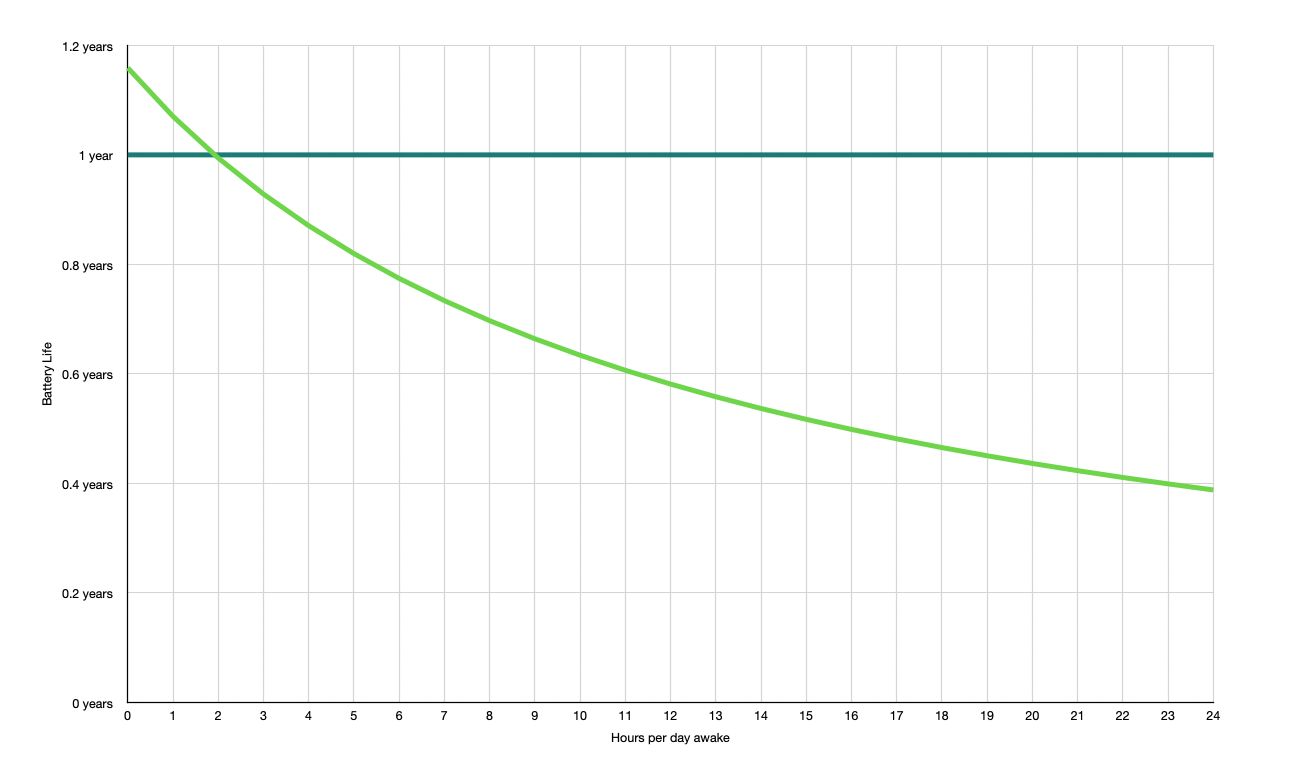
In fact, I did a spreadsheet trying to work out the expected battery life, and this is where the “year-long battery life (estimated)” comes from: if we can stick to active mode for two hours a day on average, the watch should last a year. The math makes sense to me. But of course, this is only in theory. If we want to test it out, we can’t use math alone. We have to use… SCIENCE!
Battery Test: Day 93
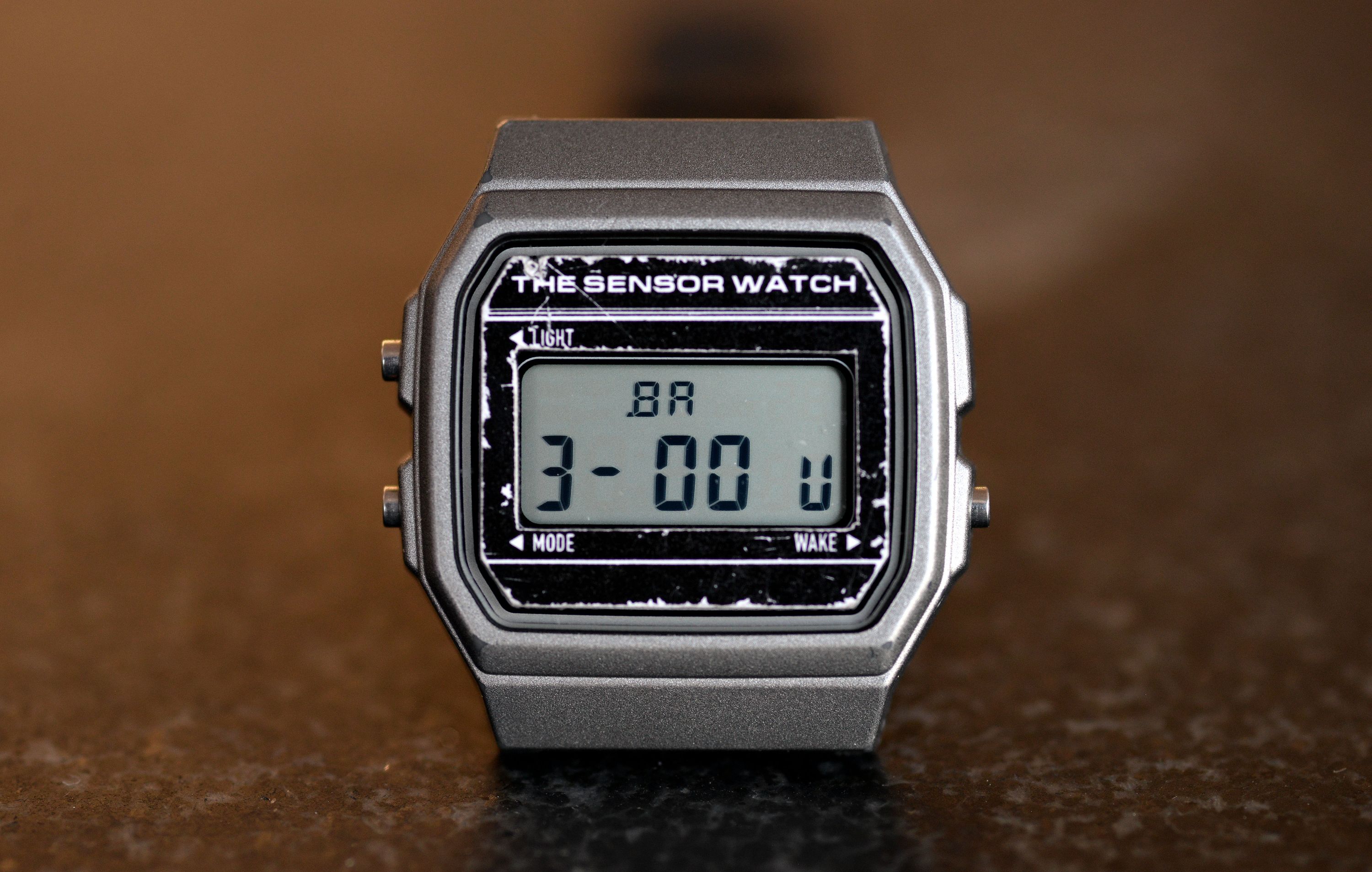
Science involves having a hypothesis and testing it by experiment. In this case, our hypothesis is that the battery in the watch should last a year. The experiment: wear it for a year! On November 8th of last year I put a fresh Energizer CR2016 coin cell in this watch, and I’ve been using the Voltage watch face to monitor the battery’s voltage ever since. So far it’s sitting pretty at 3 volts — good news so far!
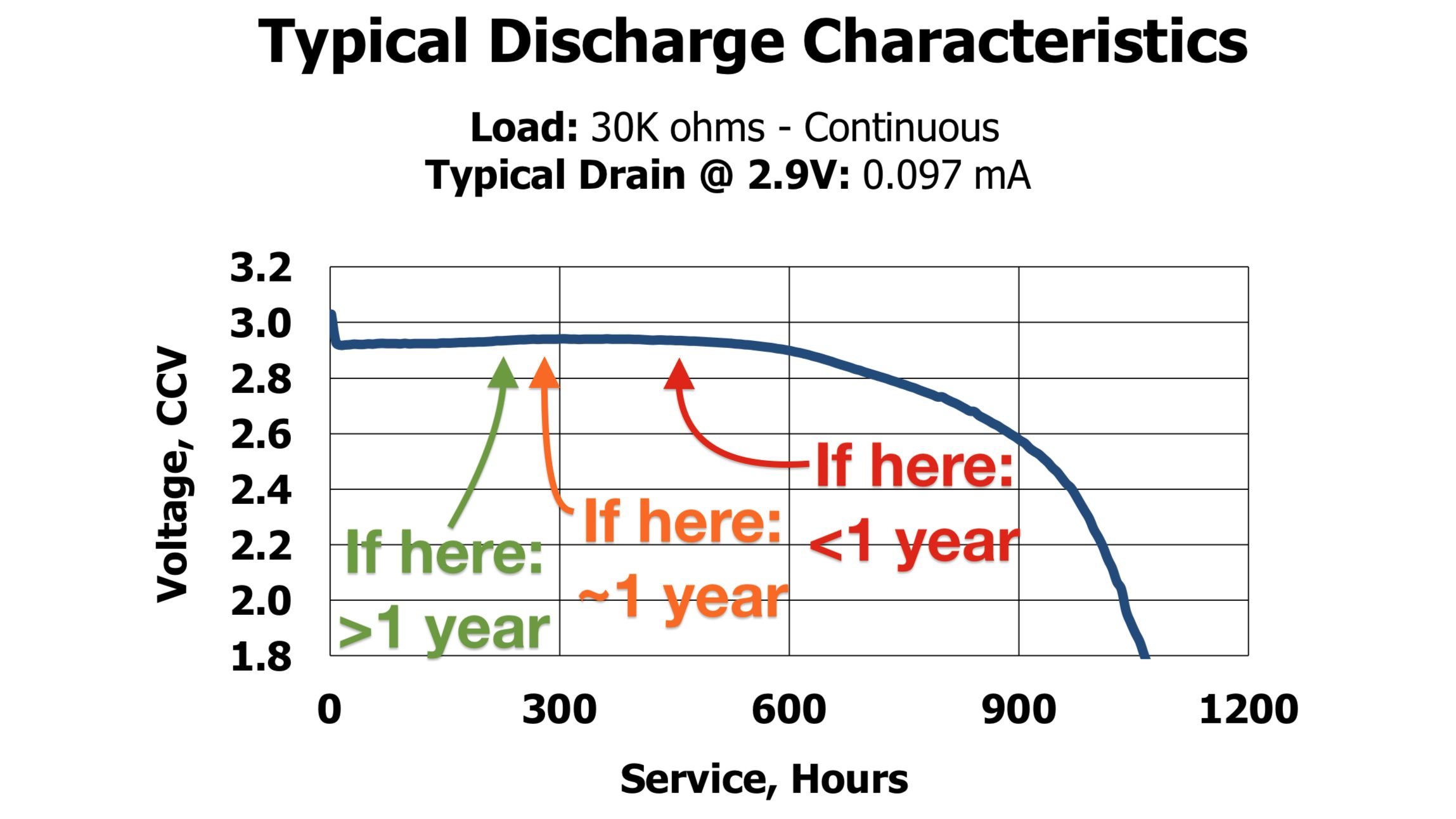
Of course, if you look again at that discharge curve, you’ll see that the battery voltage stays close to nominal for most of its life before dropping precipitously toward the end. So it’s tough to say right now whether we’re on target. The fact is, I can estimate, but only time will tell how long it can endure.