A Tour of Second Movement, the NEW Community Firmware for Sensor Watch
Originally published at Crowd Supply.
An Intro to Movement, the Community Firmware for Sensor Watch
When you buy Sensor Watch Pro, the campaign page tells you you’re getting three things: a board for the swap, a sensor for motion, and a custom LCD. Still, I’m going to let you in on a little secret: you also get a fourth thing, and it’s perhaps the most valuable one of all. You get the Sensor Watch community: a busy hive of activity where folks hack on classic Casios, but also share new watch faces and features, riff on ideas for new sensors, and generally share cool stuff they’ve done with Sensor Watch. There are roughly 1,400 folks on the Sensor Watch Discord and YOU should consider being the next!
Anyway, one of the big things the Sensor Watch community does is create new watch faces for Movement, the community firmware for Sensor Watch. A “watch face” is what other platforms might call an “app”, and when you build your Sensor Watch firmware, you can pick just the watch faces that make sense for you. For example, in the below video, I have a World Clock (which I reconfigure from Pacific Time to UTC), a prediction of the sunset time for today and the sunrise for tomorrow, the moon phase (with a look-ahead to the next full moon on the 17th), a stopwatch, and a countdown timer.
When Sensor Watch first launched on Crowd Supply, you could count the number of watch faces I’d written on two hands. Now, nearly three years later, we have literally dozens of watch faces, the vast majority of them contributions from the brilliant Sensor Watch community. I shouted out some of these watch faces in the campaign text; others, you’ll be delighted to discover for yourself when you get Sensor Watch Pro. But for all of them, I faced a conundrum this month: they were all designed for the classic Casio display.
How was I going to get them to take advantage of the new custom LCD?
Introducing Second Movement: the NEW Community Firmware for Sensor Watch
Over the last two weeks, I’ve been engaged in a deep refactor of the Movement firmware. It’s been an effort to pay down technical debt accumulated over two years of active development, and to add new APIs that make it easy to support new hardware like the accelerometer add-on and the custom LCD. What we have at the other side is the same Movement that folks have come to know and love, but with some awesome new features.
For example: where before, our sleep mode displayed via a little “tick tock” animation, Second Movement and the new custom LCD can display a little half-moon icon to indicate sleep mode. And as for animation? The colon can now blink autonomously in sleep mode. I’ll talk in a later post about the clever engineering that went into this seemingly simple feature, but for this week, I just want to say that it’s a subtle delight made possible by the new LCD.
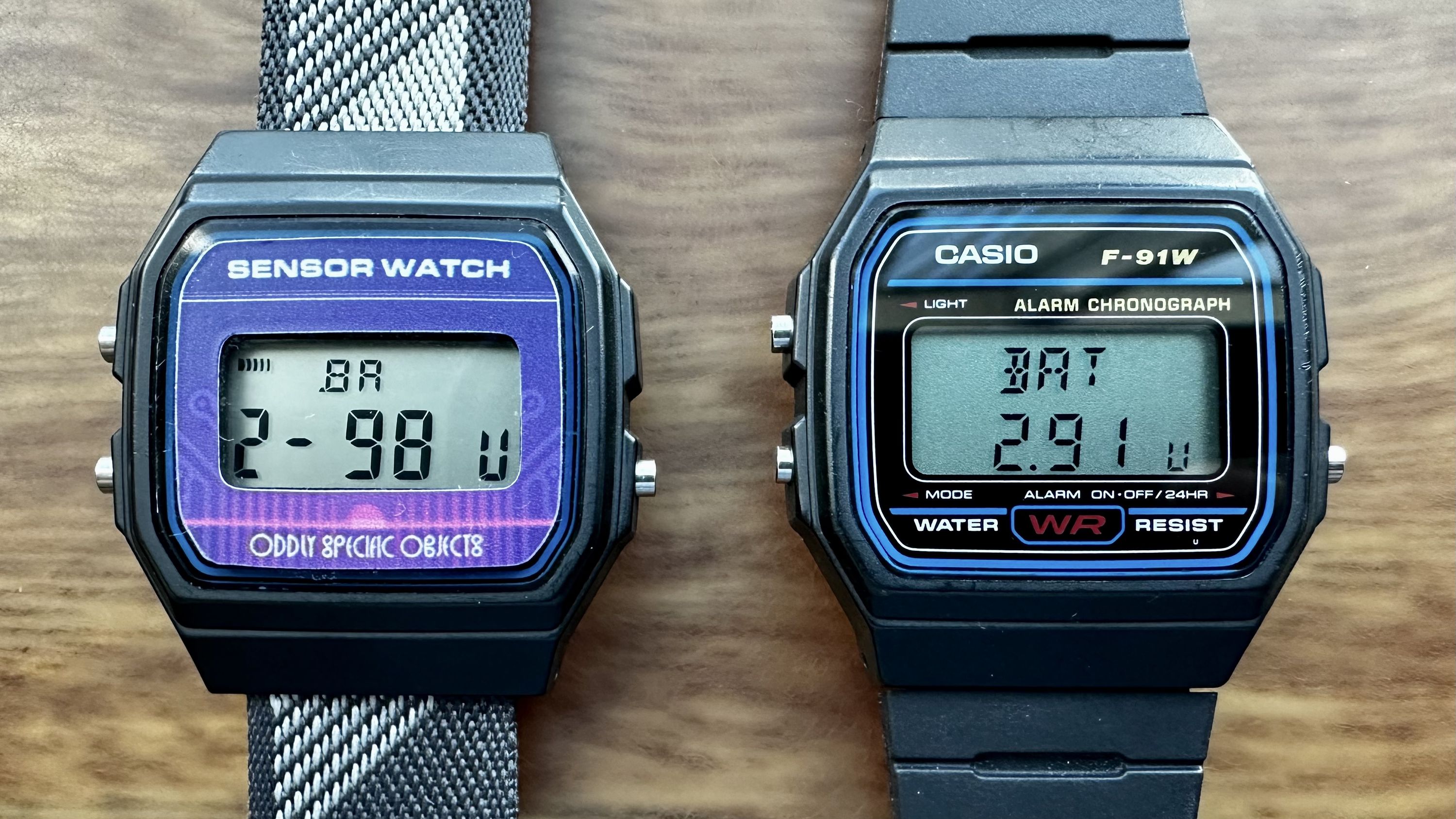
Another pain point has always been the display of numeric values on Sensor Watch: without a decimal point, we had to display numbers like “2.9 volts” as “2-9”, with a hyphen instead of a decimal. Now, thanks to a new API — tentatively called watch_display_float_with_best_effort — we can display floating point numbers up to 199.99 on either the classic or the new Sensor Watch display, while taking advantage of the decimal point on the Pro LCD:
You may also have noticed that the custom LCD now comes with five digits across the top, including three alphanumerics for the weekday and two full 7-segment digits for the day. New APIs allow you to write text to those specific areas: the watch_display_text API takes a position, like WATCH_POSITION_TOP_LEFT or WATCH_POSITION_BOTTOM, so that you can write text to specific areas of the screen. And, since the new LCD offers more possibilities than the classic, there’s also a watch_display_text_with_fallback function. For example, say for a countdown timer, you can say watch_display_text_with_fallback(WATCH_POSITION_TOP, “Timer, “CD”):
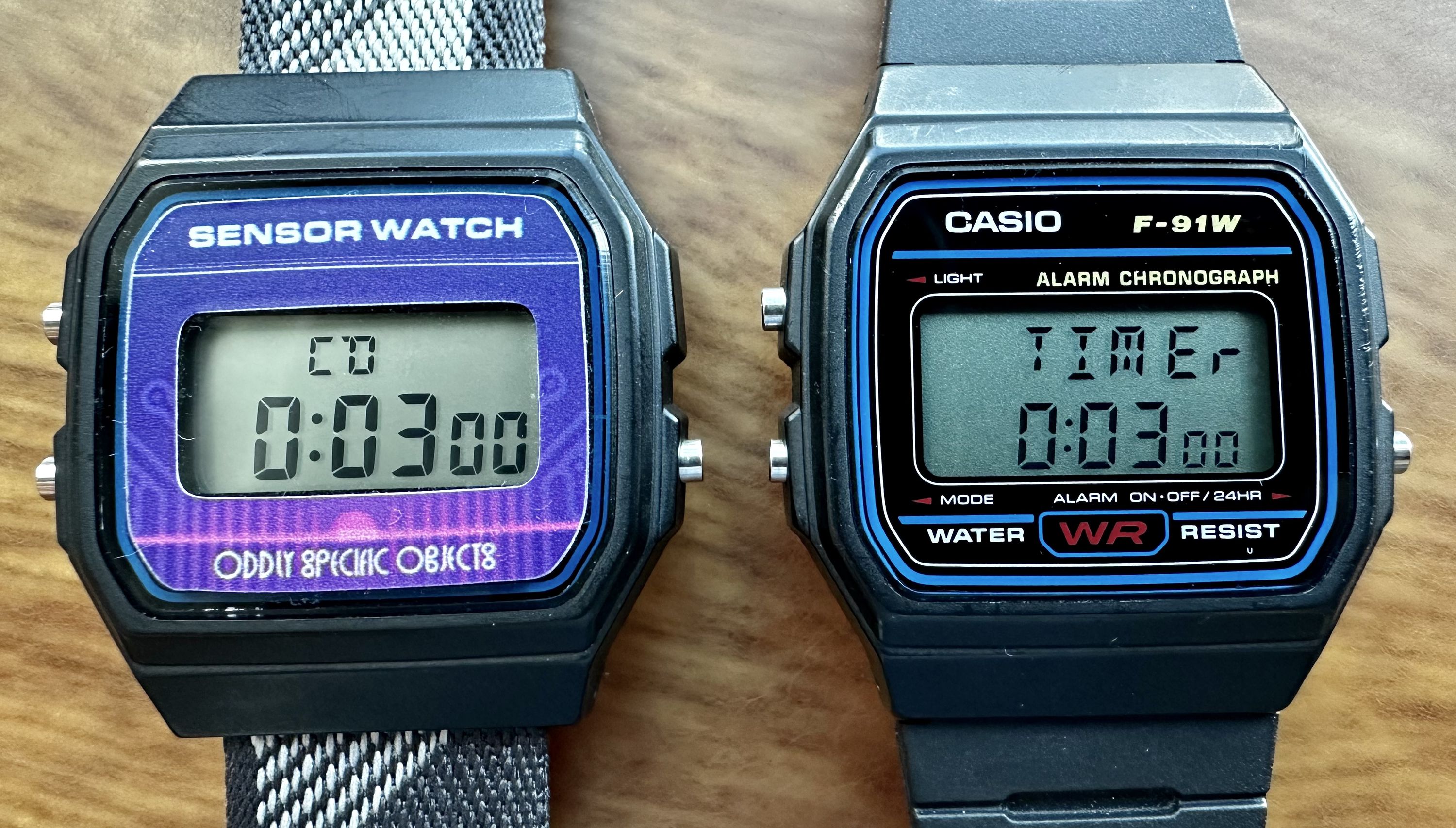
This seamlessly displays “Timer” on the new LCD, where there’s room, while falling back to “CD” on the old LCD. And — once again — when you build your Sensor Watch firmware, you won’t need to think about any of this! If a watch face opted in to this feature, you’ll just have to select the display you’re using when you build your firmware. The rest works like magic.
Second Movement: More to Come!
I will admit: a lot of the Second Movement refactor was boring, under-the-hood stuff that doesn’t make for a great backer update. Things like cleaning up brittle ADC code for the temperature and light sensors, or reworking the way we assign interrupt channels. You won’t necessarily see it, but when you delight in Sensor Watch Pro, it will be there — and it will open the door to a ton of new possibilities in terms of user interface, data transfer, and sensing.
Over in the Sensor Watch Discord, we’re already talking about how to make the best use of the new accelerometer events and folks are brainstorming about things like the best infrared transmitters to use for data input via the phototransistor. These are all cool features that we’re going to talk about in the coming weeks, but Second Movement is the first step toward making these awesome things happen, so I wanted to share that with you all first.
Next week, we’re going to talk bleeps and bloops, and how we made Sensor Watch Pro’s beepy piezo buzzer louder than ever.